Appearance
本文参考 HOHO 的掘金文章:5000 字长文深度解析 typescript 项目中的 esm 模块依赖问题 感谢 HOHO 的经验分享,给我们提供了宝贵的经验,下面总结一下它的文章。
在 package.json 里加入我们的 ts-node 执行命令,执行后 ts-node 就会去读 index.ts 并执行代码:
js
"scripts": {
    "dev": "ts-node --files ./index.ts",
    "build": "tsc"
}"scripts": {
"dev": "ts-node --files ./index.ts",
"build": "tsc"
}通过修改 tsconfig.json 可以调整编译产物的模式,可以修改 compilerOptions 下的 module、target 来让编译后的代码直接使用 import 引入依赖
js
{
    "compilerOptions": {
        // ...
        "module": "ES2022",
        "target": "Node16",
    },
    // ...
}
{
"compilerOptions": {
// ...
"module": "ES2022",
"target": "Node16",
},
// ...
}moduleResolution、module、target 的区别
找不到 ESM 模块
js
D:\project\ts-esm-juejin\node_modules\ts-node\src\index.ts:843
    return new TSError(diagnosticText, diagnosticCodes, diagnostics);
           ^
TSError: ⨯ Unable to compile TypeScript:
index.ts:1:24 - error TS2792: Cannot find module 'nanoid'. Did you mean to set the 'moduleResolution' option to 'node', or to add aliases to the 'paths' option?

1 import { nanoid } from "nanoid";
                         ~~~~~~~~

    at createTSError (D:\project\ts-esm-juejin\node_modules\ts-node\src\index.ts:843:12)
    at reportTSError (D:\project\ts-esm-juejin\node_modules\ts-node\src\index.ts:847:19)
    at getOutput (D:\project\ts-esm-juejin\node_modules\ts-node\src\index.ts:1057:36)
    at Object.compile (D:\project\ts-esm-juejin\node_modules\ts-node\src\index.ts:1411:41)
    at Module.m._compile (D:\project\ts-esm-juejin\node_modules\ts-node\src\index.ts:1596:30)
    at Module._extensions..js (node:internal/modules/cjs/loader:1153:10)
    at Object.require.extensions.<computed> [as .ts] (D:\project\ts-esm-juejin\node_modules\ts-node\src\index.ts:1600:12)
    at Module.load (node:internal/modules/cjs/loader:981:32)
    at Function.Module._load (node:internal/modules/cjs/loader:822:12)
    at Function.executeUserEntryPoint [as runMain] (node:internal/modules/run_main:81:12) {
  diagnosticCodes: [ 2792 ]
}
The terminal process "C:\WINDOWS\System32\WindowsPowerShell\v1.0\powershell.exe -Command npm run dev" terminated with exit code: 1.D:\project\ts-esm-juejin\node_modules\ts-node\src\index.ts:843
return new TSError(diagnosticText, diagnosticCodes, diagnostics);
^
TSError: ⨯ Unable to compile TypeScript:
index.ts:1:24 - error TS2792: Cannot find module 'nanoid'. Did you mean to set the 'moduleResolution' option to 'node', or to add aliases to the 'paths' option?
1 import { nanoid } from "nanoid";
~~~~~~~~
at createTSError (D:\project\ts-esm-juejin\node_modules\ts-node\src\index.ts:843:12)
at reportTSError (D:\project\ts-esm-juejin\node_modules\ts-node\src\index.ts:847:19)
at getOutput (D:\project\ts-esm-juejin\node_modules\ts-node\src\index.ts:1057:36)
at Object.compile (D:\project\ts-esm-juejin\node_modules\ts-node\src\index.ts:1411:41)
at Module.m._compile (D:\project\ts-esm-juejin\node_modules\ts-node\src\index.ts:1596:30)
at Module._extensions..js (node:internal/modules/cjs/loader:1153:10)
at Object.require.extensions.<computed> [as .ts] (D:\project\ts-esm-juejin\node_modules\ts-node\src\index.ts:1600:12)
at Module.load (node:internal/modules/cjs/loader:981:32)
at Function.Module._load (node:internal/modules/cjs/loader:822:12)
at Function.executeUserEntryPoint [as runMain] (node:internal/modules/run_main:81:12) {
diagnosticCodes: [ 2792 ]
}
The terminal process "C:\WINDOWS\System32\WindowsPowerShell\v1.0\powershell.exe -Command npm run dev" terminated with exit code: 1.好,换了个报错。可以看到它的提示里说指定 moduleResolution: node 有可能能修复这个问题。这是个坑,正确的做法应该是将其设置为 moduleResolution: Node16。
这里解释一下很多人困惑的地方,moduleResolution、module、target 的区别:
- moduleResolution 用于指定 typescript 如何去查找代码中引入的文件
- module 代表代码使用的模块化方案
- target 代表最终代码会被编译成哪个版本
单这么说可能会让人有点懵,咱们先从最简单的开始说起:
target 字段
这个字段代表着我们打包后的代码对应的js 版本,所以 target 选项就是单纯的 ES 版本号:ES2015、ES2016、ES5、ES6、ESNext
但是最终的成果代码也不一定是对应版本的,target 字段标注了打包的大方向,一些细节会受到其他参数的影响,比如下面要讲的 module 字段。
module 字段
当前项目使用的模块化方案,所以其选项是 js 历史上出现过的模块化方案:AMD、CommonJS、ES2015、ES6、Node16、NodeNext、None、System、UMD等。
不熟悉的同学可能会有点懵,这怎么这么多 ESXXX? node 模块化方案不就 CommonJS、ES6 和其他的一些老方案么?
欸,这你就有所不知了,ES6 的模块化方案也是随着 ES 版本的更迭在不断的进化的。例如 ES2020 新增了动态 import 和 i。而 Node16 及以后的 NodeNext / ESNext 则增强了 esm 方案的兼容性,使其 可以原生引入使用 CommonJS 方案的模块。可以参考 TypeScript: TSConfig Reference 简单了解一下。
所以说,这些 ES 版本虽然都是在用 import / export,但是每个都有小小的差异,所以确实是不同的模块化方案。
回归正题,module 参数的优先级是比 target 高的,所以在打包到模块引入相关的代码时,会先使用 module 指定的方案,没有的话才会通过 target 找到对应的方案,例如 target:ES3 就会使用 CommonJS。这些在文档里都有标注
moduleResolution
最后咱们来说一下这个 moduleResolution 是啥东西,它其实是指在打包时 如何搜索引入的文件,所以你可以看到它的选项就集中在几个差异比较大的方案上。
其中,Node 代表 CommonJS 方案,Node16 和 NodeNext 是 ESM 方案。而 Classic 方案则是 typescript 的锅,它在早期阶段(1.x 版本)实现的 import 引入逻辑和目前的 ESM 方案是有差异的,所以这个选项是为了向后兼容,新项目用不到。
这个选项的主要目的是为了应付日益复杂的 js 模块化方案。一个项目中可能会同时存在多个不同的模块化方案。而这个选项就提供了一个“逃生通道”,比如我想最后生成 esm 代码,但是在编译时使用 commonjs 的方案来引入其他模块。
现在的 tsconfig.json
json
{
    "compilerOptions": {
        "outDir": "dist",
        "skipLibCheck": true,
        "strict": true,
        "noEmit": false,
        "target": "ES6",
        "module": "Node16",
        "moduleResolution": "Node16"
    },
    "include": ["**/*.ts"]
}
{
"compilerOptions": {
"outDir": "dist",
"skipLibCheck": true,
"strict": true,
"noEmit": false,
"target": "ES6",
"module": "Node16",
"moduleResolution": "Node16"
},
"include": ["**/*.ts"]
}好,现在继续 npm run dev
设置当前项目的模块化方案
bash
D:\project\ts-esm-juejin\node_modules\ts-node\src\index.ts:843
    return new TSError(diagnosticText, diagnosticCodes, diagnostics);
           ^
TSError: ⨯ Unable to compile TypeScript:
index.ts:1:24 - error TS1471: Module 'nanoid' cannot be imported using this construct. The specifier only resolves to an ES module, which cannot be imported synchronously. Use dynamic import instead.

1 import { nanoid } from "nanoid";
                         ~~~~~~~~
    at createTSError (D:\project\ts-esm-juejin\node_modules\ts-node\src\index.ts:843:12)
    at reportTSError (D:\project\ts-esm-juejin\node_modules\ts-node\src\index.ts:847:19)
    at getOutput (D:\project\ts-esm-juejin\node_modules\ts-node\src\index.ts:1057:36)
    at Object.compile (D:\project\ts-esm-juejin\node_modules\ts-node\src\index.ts:1411:41)
    at Module.m._compile (D:\project\ts-esm-juejin\node_modules\ts-node\src\index.ts:1596:30)
    at Module._extensions..js (node:internal/modules/cjs/loader:1153:10)
    at Object.require.extensions.<computed> [as .ts] (D:\project\ts-esm-juejin\node_modules\ts-node\src\index.ts:1600:12)
    at Module.load (node:internal/modules/cjs/loader:981:32)
    at Function.Module._load (node:internal/modules/cjs/loader:822:12)
    at Function.executeUserEntryPoint [as runMain] (node:internal/modules/run_main:81:12) {
  diagnosticCodes: [ 1471 ]
}
The terminal process "C:\WINDOWS\System32\WindowsPowerShell\v1.0\powershell.exe -Command npm run dev" terminated with exit code: 1.
D:\project\ts-esm-juejin\node_modules\ts-node\src\index.ts:843
return new TSError(diagnosticText, diagnosticCodes, diagnostics);
^
TSError: ⨯ Unable to compile TypeScript:
index.ts:1:24 - error TS1471: Module 'nanoid' cannot be imported using this construct. The specifier only resolves to an ES module, which cannot be imported synchronously. Use dynamic import instead.
1 import { nanoid } from "nanoid";
~~~~~~~~
at createTSError (D:\project\ts-esm-juejin\node_modules\ts-node\src\index.ts:843:12)
at reportTSError (D:\project\ts-esm-juejin\node_modules\ts-node\src\index.ts:847:19)
at getOutput (D:\project\ts-esm-juejin\node_modules\ts-node\src\index.ts:1057:36)
at Object.compile (D:\project\ts-esm-juejin\node_modules\ts-node\src\index.ts:1411:41)
at Module.m._compile (D:\project\ts-esm-juejin\node_modules\ts-node\src\index.ts:1596:30)
at Module._extensions..js (node:internal/modules/cjs/loader:1153:10)
at Object.require.extensions.<computed> [as .ts] (D:\project\ts-esm-juejin\node_modules\ts-node\src\index.ts:1600:12)
at Module.load (node:internal/modules/cjs/loader:981:32)
at Function.Module._load (node:internal/modules/cjs/loader:822:12)
at Function.executeUserEntryPoint [as runMain] (node:internal/modules/run_main:81:12) {
diagnosticCodes: [ 1471 ]
}
The terminal process "C:\WINDOWS\System32\WindowsPowerShell\v1.0\powershell.exe -Command npm run dev" terminated with exit code: 1.打脸啪啪响啊,这是又整了个花活,不过不要急,这是因为我们的 esm 项目改造还没完成。看一下报错,它说 只能在 ES module 中使用 import 引入模块 nanoid。难道说 node 觉得现在项目不是 esm?
没错,确实是这个原因。由于 esm 和 commonJS 方案的差异巨大。node 需要一些东西分辨 npm 安装的包是使用的哪个方案,这就是 package.json 的 type 字段:
json
{
    ...
    "type": "module"
    ...
}
{
...
"type": "module"
...
}无法识别.ts 后缀
bash
TypeError [ERR_UNKNOWN_FILE_EXTENSION]: Unknown file extension ".ts" for D:\project\ts-esm-juejin\index.ts
    at new NodeError (node:internal/errors:371:5)
    at Object.file: (node:internal/modules/esm/get_format:72:15)
    at defaultGetFormat (node:internal/modules/esm/get_format:85:38)
    at defaultLoad (node:internal/modules/esm/load:13:42)
    at ESMLoader.load (node:internal/modules/esm/loader:303:26)
    at ESMLoader.moduleProvider (node:internal/modules/esm/loader:230:58)
    at new ModuleJob (node:internal/modules/esm/module_job:63:26)
    at ESMLoader.getModuleJob (node:internal/modules/esm/loader:244:11)
    at async Promise.all (index 0)
    at async ESMLoader.import (node:internal/modules/esm/loader:281:24) {
  code: 'ERR_UNKNOWN_FILE_EXTENSION'
}
The terminal process "C:\WINDOWS\System32\WindowsPowerShell\v1.0\powershell.exe -Command npm run dev" terminated with exit code: 1.
TypeError [ERR_UNKNOWN_FILE_EXTENSION]: Unknown file extension ".ts" for D:\project\ts-esm-juejin\index.ts
at new NodeError (node:internal/errors:371:5)
at Object.file: (node:internal/modules/esm/get_format:72:15)
at defaultGetFormat (node:internal/modules/esm/get_format:85:38)
at defaultLoad (node:internal/modules/esm/load:13:42)
at ESMLoader.load (node:internal/modules/esm/loader:303:26)
at ESMLoader.moduleProvider (node:internal/modules/esm/loader:230:58)
at new ModuleJob (node:internal/modules/esm/module_job:63:26)
at ESMLoader.getModuleJob (node:internal/modules/esm/loader:244:11)
at async Promise.all (index 0)
at async ESMLoader.import (node:internal/modules/esm/loader:281:24) {
code: 'ERR_UNKNOWN_FILE_EXTENSION'
}
The terminal process "C:\WINDOWS\System32\WindowsPowerShell\v1.0\powershell.exe -Command npm run dev" terminated with exit code: 1.这个地方让原文作者卡了几个小时,翻遍 stackoverflow。最后发现问题是 ts-node 导致的。
有两种方式可以解决这个问题
- 使用 ts-node-esm
- 为 ts-node 进行配置
第一个方案很简单,下面说说第二个方案,参考ts-node 文档
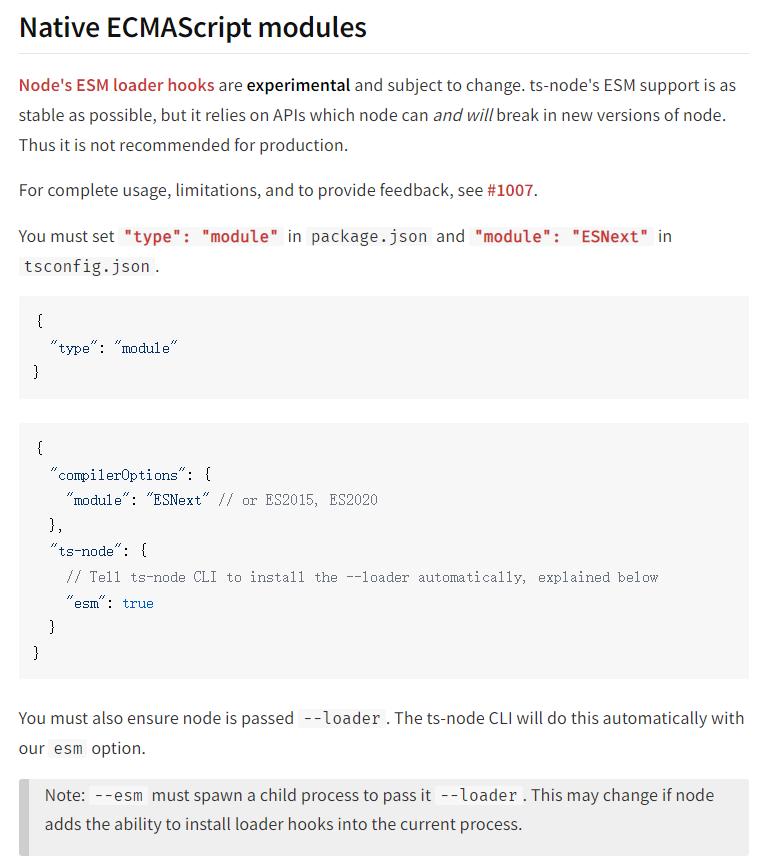
开启 ts-node 的 esm 模块解析就没有问题了
使用"moduleResolution": "node16"
bash
$ ts-node --files ./index.ts
ReferenceError: exports is not defined in ES module scope
    at file:///D:/project/test/test/index.ts:2:23
    at ModuleJob.run (node:internal/modules/esm/module_job:193:25)
    at async Promise.all (index 0)
    at async ESMLoader.import (node:internal/modules/esm/loader:533:24)
    at async loadESM (node:internal/process/esm_loader:91:5)
    at async handleMainPromise (node:internal/modules/run_main:65:12)
error Command failed with exit code 1.
info Visit https://yarnpkg.com/en/docs/cli/run for documentation about this command.
$ ts-node --files ./index.ts
ReferenceError: exports is not defined in ES module scope
at file:///D:/project/test/test/index.ts:2:23
at ModuleJob.run (node:internal/modules/esm/module_job:193:25)
at async Promise.all (index 0)
at async ESMLoader.import (node:internal/modules/esm/loader:533:24)
at async loadESM (node:internal/process/esm_loader:91:5)
at async handleMainPromise (node:internal/modules/run_main:65:12)
error Command failed with exit code 1.
info Visit https://yarnpkg.com/en/docs/cli/run for documentation about this command.使用"moduleResolution": "node16"可以解决这个问题,node16 相比于 node,兼容了 esm 和 commonjs 两种模块化。
有一个比较烦人的点,使用 node16 或者 nodenext 的时候,导入自定义模块的时候,必须添加后缀名。
bash
D:\project\test\test\node_modules\.pnpm\ts-node@10.9.1_typescript@5.0.4\node_modules\ts-node\src\index.ts:859
    return new TSError(diagnosticText, diagnosticCodes, diagnostics);
           ^
TSError: ⨯ Unable to compile TypeScript:
index.ts:2:22 - error TS2835: Relative import paths need explicit file extensions in EcmaScript imports when '--moduleResolution' is 'node16' or 'nodenext'. Did you mean './utils.js'?

2 import { plus } from './utils'
                       ~~~~~~~~~

    at createTSError (D:\project\test\test\node_modules\.pnpm\ts-node@10.9.1_typescript@5.0.4\node_modules\ts-node\src\index.ts:859:12)
    at reportTSError (D:\project\test\test\node_modules\.pnpm\ts-node@10.9.1_typescript@5.0.4\node_modules\ts-node\src\index.ts:863:19)
    at getOutput (D:\project\test\test\node_modules\.pnpm\ts-node@10.9.1_typescript@5.0.4\node_modules\ts-node\src\index.ts:1077:36)
    at Object.compile (D:\project\test\test\node_modules\.pnpm\ts-node@10.9.1_typescript@5.0.4\node_modules\ts-node\src\index.ts:1433:41)
    at transformSource (D:\project\test\test\node_modules\.pnpm\ts-node@10.9.1_typescript@5.0.4\node_modules\ts-node\src\esm.ts:400:37)
    at D:\project\test\test\node_modules\.pnpm\ts-node@10.9.1_typescript@5.0.4\node_modules\ts-node\src\esm.ts:278:53
    at async addShortCircuitFlag (D:\project\test\test\node_modules\.pnpm\ts-node@10.9.1_typescript@5.0.4\node_modules\ts-node\src\esm.ts:409:15)
    at async nextLoad (node:internal/modules/esm/loader:165:22)
    at async ESMLoader.load (node:internal/modules/esm/loader:608:20)
    at async ESMLoader.moduleProvider (node:internal/modules/esm/loader:464:11) {
  diagnosticCodes: [ 2835 ]
}
error Command failed with exit code 1.
info Visit https://yarnpkg.com/en/docs/cli/run for documentation about this command.
D:\project\test\test\node_modules\.pnpm\ts-node@10.9.1_typescript@5.0.4\node_modules\ts-node\src\index.ts:859
return new TSError(diagnosticText, diagnosticCodes, diagnostics);
^
TSError: ⨯ Unable to compile TypeScript:
index.ts:2:22 - error TS2835: Relative import paths need explicit file extensions in EcmaScript imports when '--moduleResolution' is 'node16' or 'nodenext'. Did you mean './utils.js'?
2 import { plus } from './utils'
~~~~~~~~~
at createTSError (D:\project\test\test\node_modules\.pnpm\ts-node@10.9.1_typescript@5.0.4\node_modules\ts-node\src\index.ts:859:12)
at reportTSError (D:\project\test\test\node_modules\.pnpm\ts-node@10.9.1_typescript@5.0.4\node_modules\ts-node\src\index.ts:863:19)
at getOutput (D:\project\test\test\node_modules\.pnpm\ts-node@10.9.1_typescript@5.0.4\node_modules\ts-node\src\index.ts:1077:36)
at Object.compile (D:\project\test\test\node_modules\.pnpm\ts-node@10.9.1_typescript@5.0.4\node_modules\ts-node\src\index.ts:1433:41)
at transformSource (D:\project\test\test\node_modules\.pnpm\ts-node@10.9.1_typescript@5.0.4\node_modules\ts-node\src\esm.ts:400:37)
at D:\project\test\test\node_modules\.pnpm\ts-node@10.9.1_typescript@5.0.4\node_modules\ts-node\src\esm.ts:278:53
at async addShortCircuitFlag (D:\project\test\test\node_modules\.pnpm\ts-node@10.9.1_typescript@5.0.4\node_modules\ts-node\src\esm.ts:409:15)
at async nextLoad (node:internal/modules/esm/loader:165:22)
at async ESMLoader.load (node:internal/modules/esm/loader:608:20)
at async ESMLoader.moduleProvider (node:internal/modules/esm/loader:464:11) {
diagnosticCodes: [ 2835 ]
}
error Command failed with exit code 1.
info Visit https://yarnpkg.com/en/docs/cli/run for documentation about this command.所以,还是不能采用将 moduleResolution 设置为 node16。不能省略后缀,太不舒适了。
采用 node 呢,会有exports is not defined in ES module scope的报错,应该把这个错误解决了。